
What Is Mobile Banking in Simple Terms?
What Is Mobile Banking in Simple Terms?
Mobile banking means managing your bank account from an app on your phone or tablet. You can check your balance, move money, pay bills, deposit a check by taking its photo, and get alerts when money moves, all without visiting a branch or opening a laptop. The bank’s app is the branch in your pocket, open 24 hours a day.
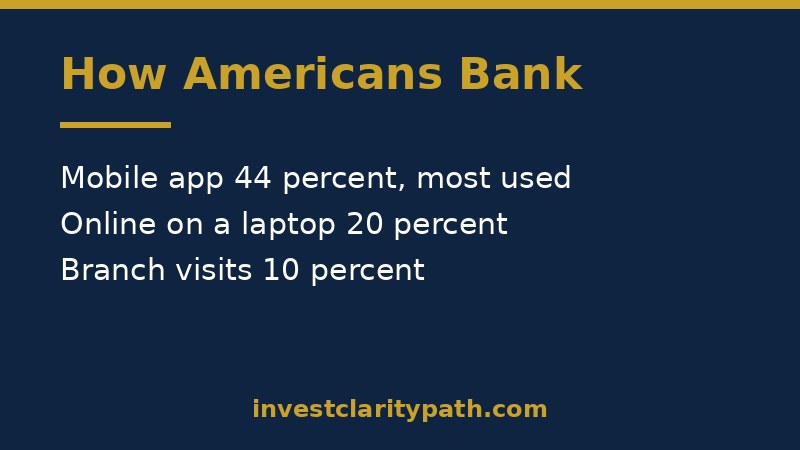
It is now the most popular way Americans bank. In the American Bankers Association’s October 2026 survey of 4,402 adults, 44 percent said they used a mobile banking app most often to manage their accounts in the past year, against 20 percent who used online banking on a laptop or PC and 10 percent who visited a branch. Mobile apps have been the top banking channel for seven years in a row. The share has risen from 26 percent in 2017, when the survey began. More than half of Gen Z and Millennials bank by app most often, and a third of Baby Boomers do too.
This guide explains what mobile banking does, how to set it up safely, and when a branch is still the better choice. It is educational only. It is not financial advice.
Mobile Banking vs Online Banking: What Is the Difference?
Mobile banking and online banking do the same jobs through different screens. Mobile banking runs in your bank’s app on a phone or tablet. Online banking runs in a web browser on a laptop or desktop computer. The account is the same. The balance is the same. Only the device changes.
The app adds check deposit by camera, fingerprint sign-in, and push alerts. The browser shows more detail on one screen, which some people prefer for a monthly review. Most banks offer both.
One thing mobile banking is not: it is not a separate account. When you open an account at a bank, the app, the website, the branch, and the ATM all reach the same money. How Do I Choose a Bank Account as a Beginner? explains what to look for when you open one, and What Is the Difference Between a Checking and a Savings Account? explains the two accounts you will see in the app.
7 Things You Can Do in a Banking App
A banking app covers almost everything a branch does for daily money. Here are the seven uses that matter most.
First, check your balance and recent transactions. The app shows what came in, what went out, and what is left, usually the moment each payment clears. Checking it twice a week stops surprises.
Second, transfer money between your own accounts. Moving 200 dollars from checking to savings takes seconds, and it is the easiest way to save regularly. How Do I Automate Saving and Investing? shows how to make that transfer run on its own every payday.
Third, pay bills. You can pay a card, a utility, or a loan from the app, and set it to repeat each month so the bill is never late. A late payment can mean a fee and a mark on your credit record, so autopay is worth setting up for every fixed bill.
Fourth, deposit a check with your phone camera. Take a photo of the front and back, type the amount, and submit it. The worked example below shows when the money becomes available.
Fifth, send money to people. Most U.S. bank apps include Zelle or a similar service, which moves money to another person’s bank account in minutes, usually for free. Check the daily limit before you send a large amount, because limits vary by bank.
Sixth, lock and unlock your debit card. If you lose your card, you can freeze it in the app in seconds, then unfreeze it when you find it. What Is a Debit Card vs a Credit Card in Simple Terms? explains the difference between the two cards you will see in the app.
Seventh, set alerts. The app can tell you when your balance falls below an amount you choose, when a payment over a set size clears, or when a deposit arrives. Alerts warn you before the account runs low, which is the cheapest overdraft protection there is.
A Worked Example: Depositing a 500 Dollar Check by Phone
Mobile check deposit is fast, but the money is not available at once. Federal rules set the timing, and they apply to every bank. Here is what happens with a 500 dollar check deposited on a Monday through your bank’s app.
Under Regulation CC, the federal funds availability rule, your bank must make the first 275 dollars of any day’s check deposits available by the next business day. That threshold rose from 225 dollars on July 1, 2025, and stays in effect through June 30, 2030. So 275 dollars of your 500 dollar check is available on Tuesday.
The remaining 225 dollars must generally be available by the second business day after deposit, which is Wednesday. So the full 500 dollars is usable by Wednesday, two business days after you took the photo. Many banks release the money faster than the federal maximum, but they cannot legally hold it longer under normal rules.
Three details matter. First, the bank’s cutoff time counts. If you deposit after the cutoff, usually in the early evening, the clock starts the next business day, so Monday night counts as Tuesday. Second, the rules count business days only, so a Friday deposit reaches the next steps on Monday and Tuesday, not over the weekend. Third, availability is not the same as cleared. The issuing bank still has to confirm the check is real and funded, so do not spend the full amount on a check you do not trust.

How to Set Up Mobile Banking in 5 Steps
Step 1: Download your bank’s official app
Search for your bank’s name in your phone’s app store, and check that the developer is the bank itself, not a lookalike. Never download a banking app from a link in a text message or email. Install it, and turn on automatic updates so security fixes arrive on their own.
Step 2: Sign in and turn on extra security
Sign in with your online banking username and password. If you do not have online banking yet, the app will guide you through setup, usually with your account number and debit card details. Then turn on every security feature the app offers: a strong passcode, fingerprint or face sign-in, and alerts for sign-ins from a new device. A password alone is the weakest option. Two checks are much stronger than one.
Step 3: Check that your accounts and cards are all there
Open the app and confirm that every account you own appears: checking, savings, and any card. If an account is missing, call the bank or visit a branch to link it. While you are there, check the balance against your last statement. If anything looks wrong, report it at once. Do not wait, because most banks give you a limited time to report an error.
Step 4: Set up alerts, autopay, and autosave
Set three things on day one. First, a low-balance alert at an amount that gives you time to act, such as 100 dollars. Second, autopay for every fixed bill, so nothing is ever late. Third, an automatic transfer to savings on payday. Is a High-Yield Savings Account Safe? explains where that transfer should go, and What Is APY, and Why Is It Different From Interest Rate? explains the rate to compare. A 200 dollar monthly transfer is 2,400 dollars a year, and it happens without a decision each month.
Step 5: Test a mobile deposit with a small check
Before you trust mobile deposit with a large check, test it with a small one. Photograph it in good light on a dark surface, endorse it as the app asks, and submit it. Check the next day that the first 275 dollars is available, then the rest by the second business day. Keep the paper check for two weeks after it clears, then destroy it.
Is Mobile Banking Safe?
Mobile banking is safe when it is set up properly, and it carries the same protection as a branch visit. Deposits in the app are covered by the same federal insurance as deposits at a branch: the FDIC insures deposits up to 250,000 dollars per depositor, per insured bank, for each ownership category. Is My Money Safe in a Bank, and What Does Insurance Mean? explains that limit in detail. The app itself uses encryption, which scrambles your data as it travels, and most apps block check photos from saving to your camera roll.
The real risks are on your side of the screen, not the bank’s. The first risk is public Wi-Fi. Do not sign in to your bank on a public network in a cafe or airport. Use your phone’s mobile data instead, or wait until you are home. The second risk is a lost or stolen phone. A passcode, fingerprint, or face lock keeps a thief out of the app, but a phone with no lock is an open door. Set the lock now, before you need it.
The third risk is phishing. Your bank will never text you a link and ask you to sign in, and it will never call and ask for your full password or a one-time code. If a message claims your account is locked and tells you to tap a link, do not tap it. Open the app yourself, or call the number on the back of your card. The fourth risk is an old phone. A phone that no longer gets security updates is easier to attack, so update it or replace it before you bank on it.
If something goes wrong, act fast. Freeze your cards from another device or call the bank, and report a payment you did not make the same day. Banks can reverse many frauds, but only if you report them quickly.
When a Branch Is Still Better
Mobile banking covers daily money, but some jobs still need a branch. You cannot get cash from an app, and you cannot deposit a large stack of cash without an ATM or a branch. A cashier’s check, a notary stamp, a signature guarantee, and a safe deposit box all need a person in a building. Large or unusual deposits, such as a cashier’s check or a government check, also clear faster when handed to a teller in person, because the full amount can qualify for next-day availability that a mobile deposit does not get.
A branch is also better for a complicated problem, such as a disputed charge or a loan application. The app is the everyday tool. The branch is the backup for the few jobs the app cannot do.
Common Mistakes to Avoid
The first mistake is using a weak password and no second check. A short password that you reuse elsewhere is the easiest way into an account. Use a long, unique password, turn on fingerprint or face sign-in, and turn on alerts for new-device sign-ins.
The second mistake is banking on public Wi-Fi. A public network can be watched, and a watched sign-in can be stolen. Use mobile data or your home network, and never sign in from a shared computer that may remember your details.
The third mistake is ignoring alerts. Alerts only help if you read them. A low-balance alert you ignore is the same as no alert at all. Read each one, and act on it the same day.
The fourth mistake is depositing the same check twice, in the app and at a branch. The bank will reverse one of them, so deposit a check once, keep the paper for two weeks, then destroy it. The fifth mistake is assuming the money is cleared because it is available. The check can still bounce, so do not spend a large mobile deposit on the day it becomes available if you do not trust the check.
Frequently Asked Questions
What is mobile banking in simple terms?
Mobile banking means managing your bank account from an app on your phone or tablet. You can check your balance, move money, pay bills, and deposit checks by photo, without visiting a branch.
Is mobile banking safe?
Yes, when it is set up properly. Your deposits carry the same FDIC insurance, up to 250,000 dollars per depositor per insured bank, as a branch deposit. The app uses encryption and usually asks for a fingerprint, face, or code as well as a password. The main risks are public Wi-Fi, a phone with no lock, and phishing messages.
How long does a mobile check deposit take?
Under Regulation CC, the first 275 dollars must be available by the next business day, and the rest generally by the second business day. A 500 dollar check deposited on Monday makes 275 dollars available on Tuesday and the remaining 225 dollars by Wednesday.
What is the difference between mobile banking and online banking?
Mobile banking runs in your bank’s app on a phone or tablet. Online banking runs in a web browser on a laptop or computer. The account and the money are the same. The app adds check deposit by camera, fingerprint sign-in, and push alerts.
Can I open a bank account from my phone?
Most banks let you open an account in the app, with your ID and personal details. The process usually takes 10 to 20 minutes. Some banks still ask you to visit a branch to finish the setup, especially for a joint account.
What should I do if I lose my phone?
Freeze your debit and credit cards at once, from another device or by calling the bank. Then change your password from a computer, and check your recent transactions for anything you did not make. Report it the same day.
Conclusion
Mobile banking turns your phone into a bank branch. In the latest ABA survey, 44 percent of Americans use a mobile app most often to manage their accounts, against 20 percent on a laptop and 10 percent at a branch. The app handles the daily jobs: checking balances, moving money, paying bills, depositing checks, and sending money to people. A 500 dollar check deposited by phone makes 275 dollars available the next business day and the rest by the second.
Set it up properly. Download the official app, turn on every security feature, set alerts and autopay, and test a mobile deposit with a small check first. Keep the branch for the few jobs the app cannot do. Used that way, mobile banking saves time every week and keeps your money safe, which is why it is now the way most Americans bank.
This article is for general information and education only. It is not legal or financial advice.